SvelteJS/Sapper project overview leht
Story
Minge pivotaltrackerisse ja looge uus story nimega “As a user I see an overview page when I log on”. Lisa loole järgmine ülesanned:
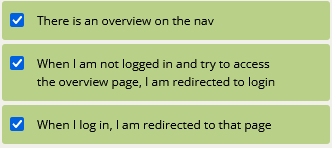
- There is an overview on the nav
- When I am not logged in and try to access the overview page, I am redirected to login
- When I log in, I am redirected to that page
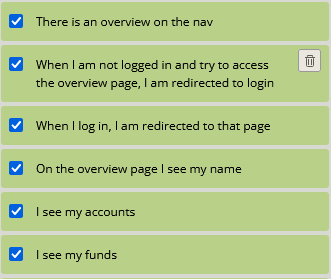
- On the overview page I see my name
- I see my accounts
- I see my funds
- I see the past operations on my accounts
- The positive sums are green and the negative sums are red
Overview alus
Alustame Nav.svelte failist, lisame ühe rea mis suunab meid overview.svelte lehtele kui me oleme sisse loginud.
| 1234567 | {#if $session.token} <li><a aria-current="{segment === 'logout' ? 'page' : undefined}"href="{logout}"on:click|preventDefault={logout}>logout</a></li> <li><a aria-current="{segment === 'overview' ? 'page' : undefined}"href="overview">overview</a></li>{:else} <li><a aria-current="{segment === 'register' ? 'page' : undefined}"href="register">register</a></li> <li><a aria-current="{segment === 'login' ? 'page' : undefined}"href="login">login</a></li>{/if} |
Seejärel loome ka ‘overview.svelte’ faili teel /src/routes

ja sisestage järgmist skript failile. See suunab kasutaja login lehele, kui ta pole sisse logitud.
| 1234567 | <script context="module"> export async function preload({ params }, { token }) { if (!token) { this.redirect(302, `/login`); } }</script> |
Pärast, minge ‘login.svelte’ failisse ja muudake esimest skripti sellele:
| 1234567 | <script context="module"> export async function preload({ params }, { token }) { if (token) { this.redirect(302, `/overview`); } }</script> |
Sellega, esimest kolm ülessanet on tehtud.
Täiendavad failid
Meil on vaja lisada 2 faili projektisse et jätkama. Esimene on ‘getMyData.js’ ja teine on ‘getTransactions.js’. Mõlemad failid asuvad teel ‘/src/routes/auth’.
getMyData faili sisu
| 12345678 | import* as api from 'api.js';exportasyncfunctionpost(reg,res){ api.get('users/current', reg.session.token ).then(response => { res.setHeader('Content-Type', 'application/json'); res.end(JSON.stringify(response)); })} |
getTransactions faili sisu
| 12345678 | import* as api from 'api.js';exportasyncfunctionpost(reg,res){ api.get('transactions', reg.session.token ).then(response => { res.setHeader('Content-Type', 'application/json'); res.end(JSON.stringify(response)); })} |
Kui mõlemad failid on lisatud, lähme ‘overview.svelte’ failisse ja lisame järgmist skripti milles on meile vajalikud funktsioonid:
| 12345678910111213 | <script> import{post} from 'utils.js'; asyncfunctiongetMyData(){ returnawaitpost('auth/getMyData').then(r=>{ r.funds = r.accounts.reduce((funds,account) => funds + account.balance,0) returnr }) } asyncfunctiongetTransactions(){ returnawaitpost('auth/getTransactions') }</script> |
Pärast ülaltootud skripti lisamist, lisa ka järgmist koodijupp mis näitab meile meie kontod info.
| 123456789101112131415161718192021 | {#if process.browser} {#await getMyData()} Loading... {:then my} <section> <p style="font-size: xx-large">{my.name}</p> </section> <section> My funds <p style="font-size: xx-large; color: {my.funds >= 0 ? 'green':'red'}">{my.funds}</p> </section> <section> <ul> {#each my.accounts as account} <li>{account.number} ({account.name})</li> {/each} </ul> </section> {/await}{/if} |
Kui te kirjutasid kõik kuni selle punktini, siis näete oma konto info overview lehel kui olete sisse loginud
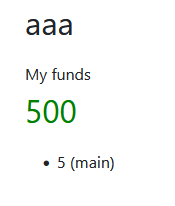
Sellega on esimest 6 ülessaned loos tehtud
Varasemate operatsioonide tabel
Lähme ‘overview.svelte’ failile jälle ja lisame sellele tabelit:
| 123456789101112131415 | <section> <table class="table table-striped table-bordered"> <thead> <tr> <th>senderName</th> <th>amount</th> <th>createdAt</th> <th>status</th> </tr> </thead> <tbody> </tbody> </table></section> |
Kui me preagu lähme meie overview lehele siis näeme ainult tühjat tabelit:
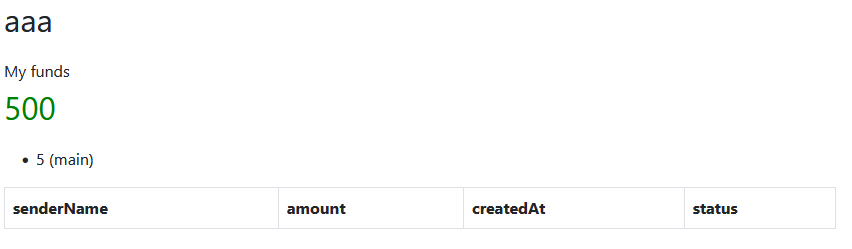
Et seda parandada muudame meie tabelit järgsena:
| 1234567891011121314151617181920212223242526 | <section> {#await getTransactions()} loading {:then transactions} <table class="table table-striped table-bordered"> <thead> <tr> <th>senderName</th> <th>amount</th> <th>createdAt</th> <th>status</th> </tr> </thead> <tbody> {#each transactions as transaction} <tr> <td><b>{transaction.senderName}</b><br>{transaction.explanation}</td> <td style="color: {transaction.amount>= 0 ? 'green' : 'red'}">{transaction.amount} {transaction.currency}</td> <td><b>{transaction.createdAt}</b><br>{transaction.explanation}</td> <td><b>{transaction.status}</b><br>{transaction.statusDetail}</td> </tr> {/each} </tbody> </table> {/await}</section> |
Sellega on kõik ülessanned tehtud. Võite teha commit’i uuel harul nimega ‘#storyIdAs_a_user_I_see_an_overview_page_when_I_log_on’, kus lisate mitte storyID aga võtate oma loo ID Pivotal Tracker’s
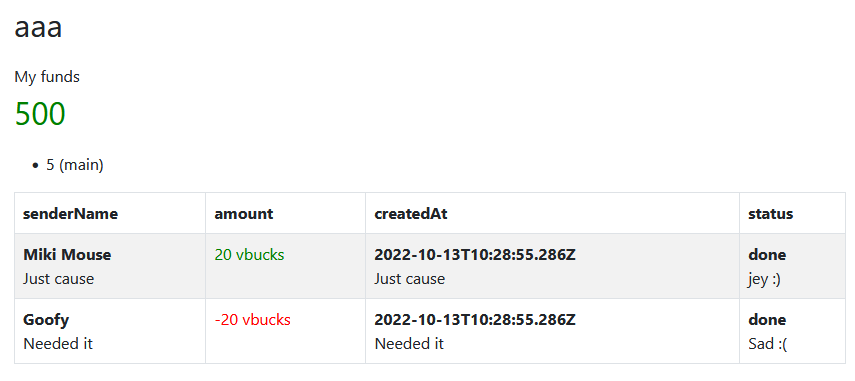
Meie tulemus
Lõpp tulemus
Overview.svelte lõppu kood
| 12345678910111213141516171819202122232425262728293031323334353637383940414243444546 | {#if process.browser} {#await getMyData()} Loading... {:then my} <section> <p style="font-size: xx-large">{my.name}</p> </section> <section> My funds <p style="font-size: xx-large; color: {my.funds >= 0 ? 'green':'red'}">{my.funds}</p> </section> <section> <ul> {#each my.accounts as account} <li>{account.number} ({account.name})</li> {/each} </ul> </section> <section> {#await getTransactions()} loading {:then transactions} <table class="table table-striped table-bordered"> <thead> <tr> <th>senderName</th> <th>amount</th> <th>createdAt</th> <th>status</th> </tr> </thead> <tbody> {#each transactions as transaction} <tr> <td><b>{transaction.senderName}</b><br>{transaction.explanation}</td> <td style="color: {transaction.amount>= 0 ? 'green' : 'red'}">{transaction.amount} {transaction.currency}</td> <td><b>{transaction.createdAt}</b><br>{transaction.explanation}</td> <td><b>{transaction.status}</b><br>{transaction.statusDetail}</td> </tr> {/each} </tbody> </table> {/await} </section> {/await}{/if} |